Product Designer · Fintech · AI · 2025–2026 · 10 min read
60 second version ↓Deep Analyst
An AI analyst that connects the news for investors, and shows its work
Designed an AI analyst that turns scattered financial news into a clear chain of events, with every step linked to its source.
Impact at a glance
- Released as a core SyFin feature
- Its citation pattern was reused in every AI brief in SyFin
- One of SyFin’s three core ways to work: browse, ask, get alerted
- Role
- Product Designer, the only designer on the team
- What I did
- User research, problem framing, interaction design, UI, prototyping, UX writing, developer handoff
- Team
- 2 co-founders · Head of AI/NLP · 1 AI/NLP engineer · 1 GraphRAG engineer · 1 knowledge graph architect · 2 frontend developers · 3 backend developers
- Timeline
- 2025–2026
- Platforms
- Web · iOS and Android (approved by both app stores, not launched)
Context
What is SyFin?
SyFin is an AI research tool for investors. Every day it reads thousands of financial news articles and official company documents. For each news item, it works out which company it’s about, whether it’s good or bad news, and how important it is. Investors use SyFin to follow the companies they own without reading everything themselves.
Key terms in this case study
- Event
- One piece of news about a company, already read and scored by SyFin.
- Event importance (magnitude)
- How serious a news event is, from Low to Major.
- Positive / negative signal
- Whether the news is good or bad for the company.
- Source
- The original article or document an answer is based on.
- AI brief
- A written analysis SyFin's AI generates — for example a narrative summary, an earnings analysis, or a theme analysis.
The 60-second version
Only designer · Research → UI → handoff
The ask: “Let’s add a chat box.”
The founders wanted faster answers. I wanted to know what “faster” really meant.
The digging: I watched 6 investors research a company.
SyFin already showed them what happened. They got stuck connecting it into one answer.
The turn: Not a faster search. An analyst.
One that connects events into a clear chain, and shows where each step comes from.
The build: Three modes, every claim sourced.
From a quick fact to a full report, every answer links back to the SyFin event behind it.
The fix: Long reports went off track.
So the AI now asks 2–4 questions before it starts writing.
The result: A core SyFin feature.
Its citation pattern was reused in every AI brief in SyFin.
The experience
The setup
The moment this design is for
20 minutes before work
It’s 7:40 in the morning. A private investor opens SyFin and sees a Major negative signal on one of his car stocks: the company has cut its profit forecast. He reads the card. He knows what happened.
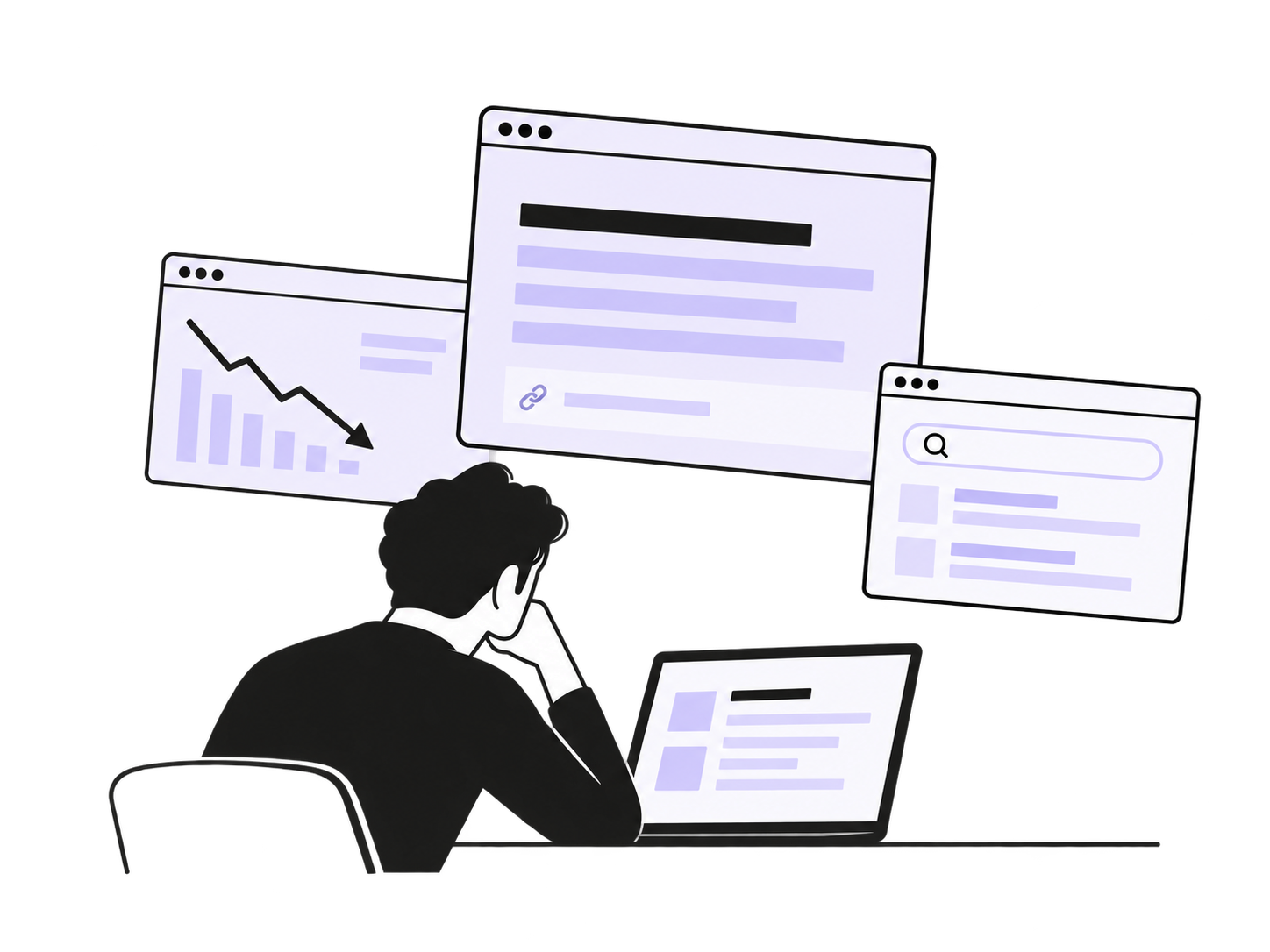
What he doesn’t know is what it means. Is it just this company, or the whole sector? Did the market already expect it? One analyst says hold, another says buy. The answer is spread across 20 events from the last three weeks. He has 20 minutes before work, and connecting them himself would take a few hours.
Core problem / research
The news wasn't the problem. Connecting it was.
The founders’ starting point was: “Users need faster answers. Let’s add a chat box.”
A chat box is a solution, not a problem. Before designing it, I wanted to know what “faster answers” really meant. SyFin already showed people what happened. So where were they still losing time?
I talked with 6 early users: 3 private investors, 2 analysts at small investment firms and 1 person from a family office (a firm that manages one wealthy family’s money). I asked them to share their screen and research a company they follow, the way they normally do.
Finding the news wasn’t the hard part. The events in SyFin’s dashboard already told them what happened. They got stuck on the next step: turning many events into one answer. They kept asking themselves three questions:
Why did it really move?
Is it just this company?
What do the bulls and bears say?
To answer them, they opened event after event and tab after tab, and built the story in their heads. Some tried a general chatbot. It summarized the latest articles, with links, but not the story behind the move: which event started it, what followed, and how the pieces connect.
So they didn’t need a faster search. They needed an analyst: one that connects the events into a clear chain, and shows where each step comes from.
So I changed the goal
How might we turn dozens of scored events into a clear chain of cause and effect, where every step leads back to its event?
This turned the project from “a chat box” into a chain of events: every step of the answer leads back to its source.
Research → design
Two things the research showed
What we saw
Sometimes people want one quick fact, sometimes a full report
What it changed
Offer different modes with different speed and depth
What we saw
Chatbots listed sources, but didn't show how the events connect
What it changed
Answers follow the chain of events, and each step links to its SyFin event card
Ownership
My contribution
Hands-on design
I ran the interviews, framed the problem, designed the full experience across modes, sources, answers, states and mobile, wrote the interface copy, and built interactive prototypes.
Leading without a product manager
SyFin had no PM, so I also:
- — turned the founders’ idea into clear product requirements
- — defined key states and edge cases for developers
- — aligned the design with what the AI team could deliver reliably
How I shaped the direction
The initial concept was a simple chat box on top of SyFin’s data. My research showed the real gap wasn’t finding events but connecting them. That led to answers built from SyFin’s own data, with every claim linked back to its event.
Design decisions
From a chain of events to the final product
Four decisions carried the research forward into the final experience.
One “smart” box confused people, so we added clear modes
Problem
What I tried
Why it failed
Decision
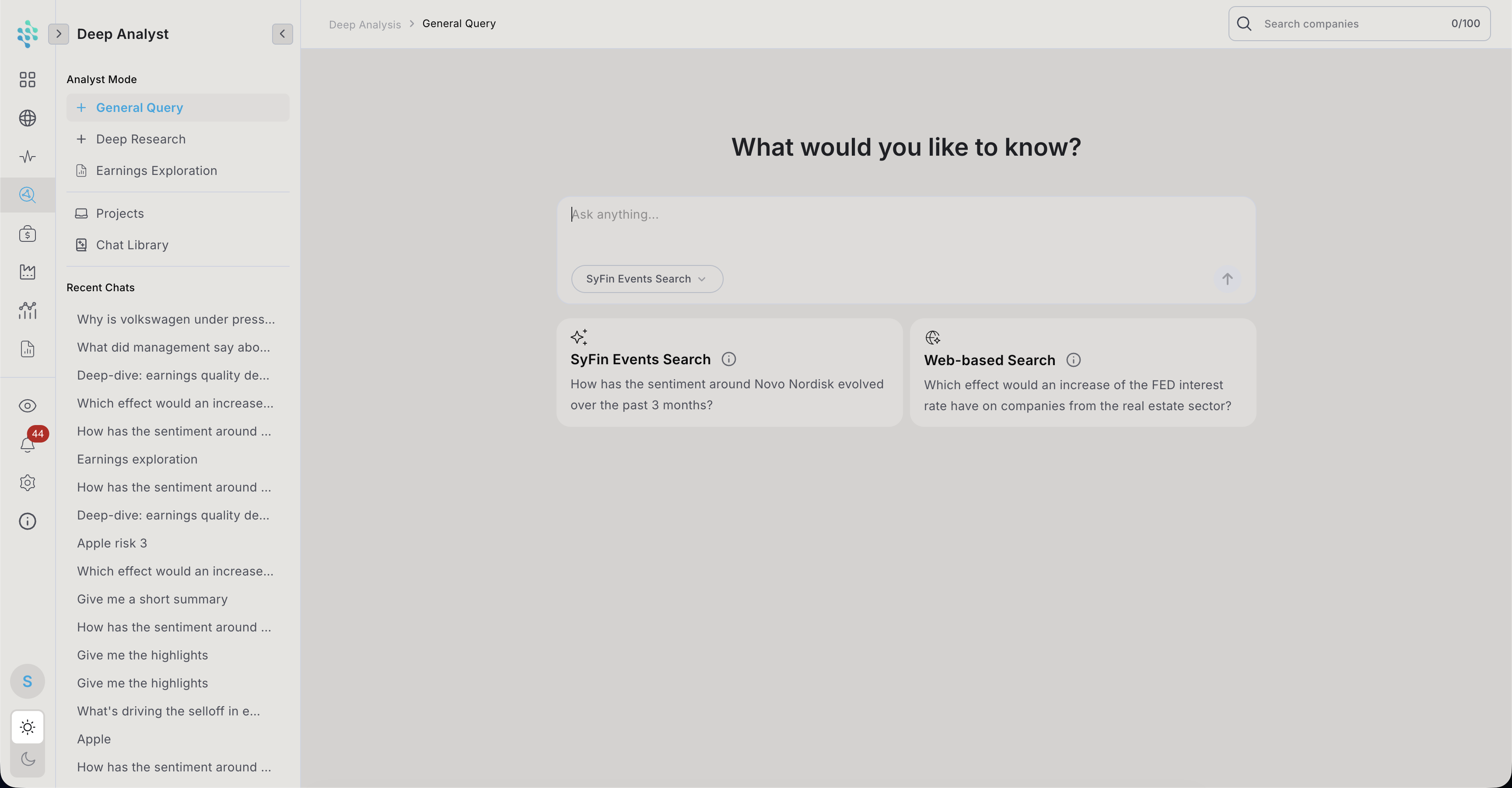
Three clear modes in the sidebar:
- General Query: quick questions, answered in seconds
- Deep Research: a longer report that the AI plans and writes step by step
- Earnings Exploration: questions about a company’s quarterly results documents
General Query and Deep Research each open on their own start screen with example questions, so people learn what they’re good at. Earnings Exploration starts from the company’s earnings files.
Result
Choosing the source before asking
Problem
Decision
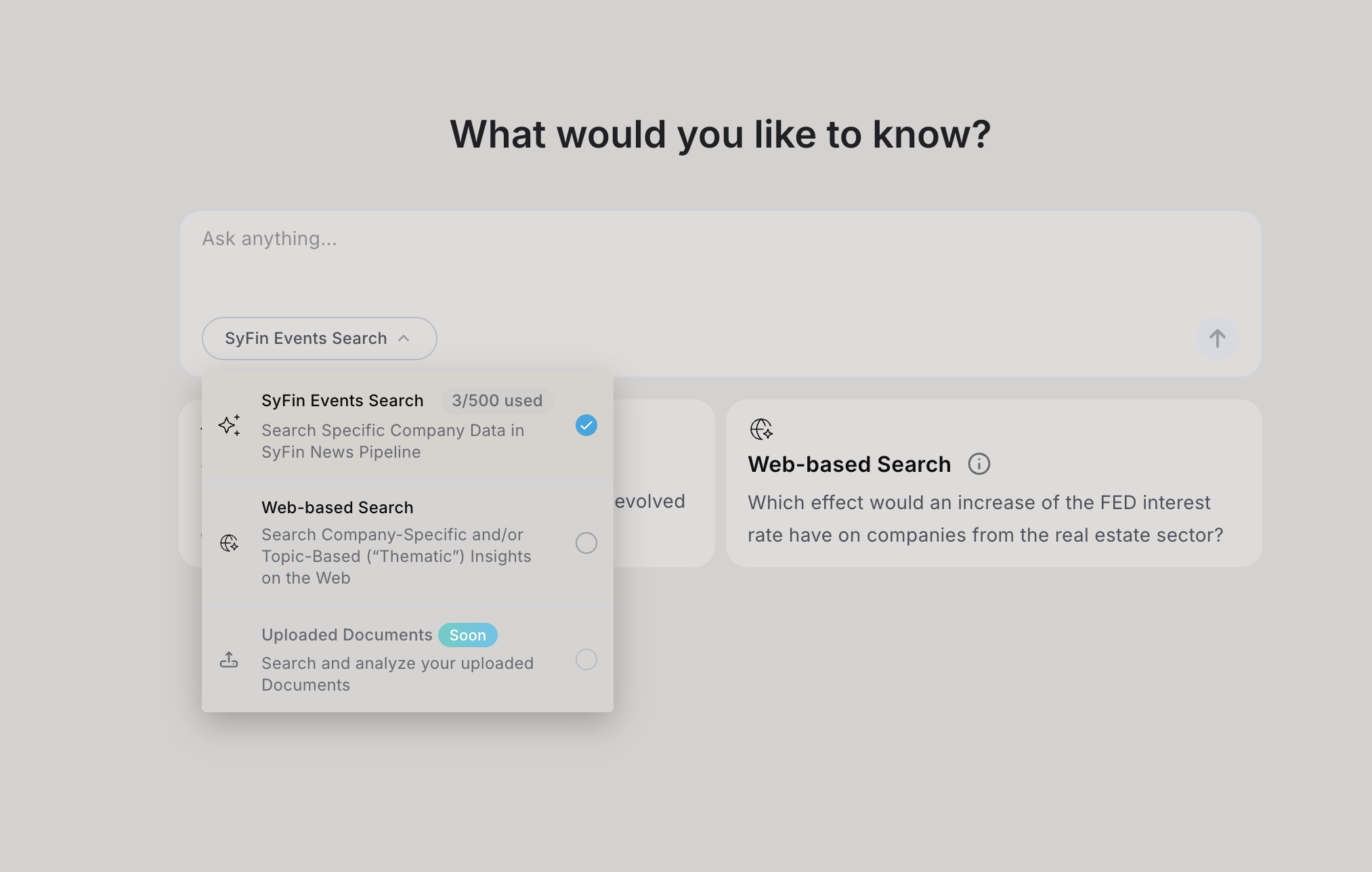
Below the input field, users pick where the answer should come from:
- SyFin Events Search: news that SyFin has already collected and scored
- Web-based Search: the open internet
Why
Sources that look like the rest of SyFin
Problem
Options considered
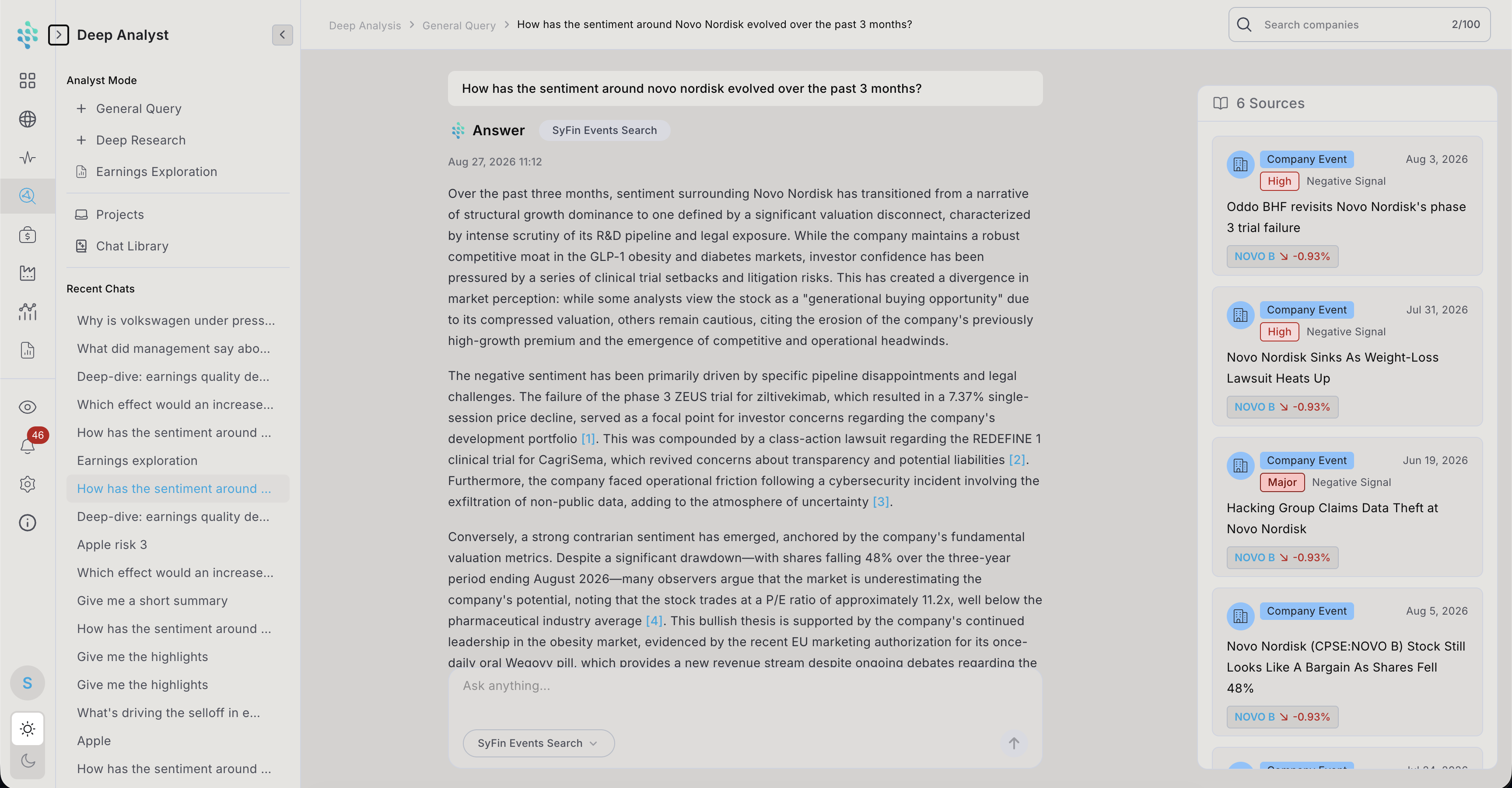
- A — a list of links
- B — small article previews
- C — SyFin’s own news cards (chosen)
Decision
Why
Result
Follow a reference
Long reports went wrong, so the AI asks first
Problem
In the first version, Deep Research started writing right away. In testing, two people got long reports about the wrong time period, and felt they had wasted one of their few daily reports.
Decision
For broad requests, the assistant first asks 2–4 short questions (for example: “Which time period?”, “Which market?”), then plans and writes the report. A step-by-step progress view shows what it’s doing while people wait.
- 1Clarifying questions
- 2Planning the report
- 3Step-by-step progress
- 4Finished report
Result
It adds one step, but people said it felt “like briefing a real analyst.” In later sessions, reports on the wrong topic stopped happening.
The system
The final experience
Start screens
Teach: “What would you like to know?”, with example questions
Answers
A short summary, numbered sources, a clear “not investment advice” note, export and three suggested follow-up questions
Sources panel
Made of SyFin news cards
Honest error states
I designed errors that say what went wrong and what to do next, for example “I couldn’t find any earnings documents for this company right now”
Projects and chat history
Projects with their own instructions and links, plus a chat library, so analysts can return to a topic over several weeks
Mobile
In the mobile app, which was approved by the App Store and Google Play but not launched yet, I kept the full web experience — every mode, every source, nothing scoped down for the smaller screen. I adapted the layout so people can trust and check an answer just as easily on the go as at their desk.
Outcome
Impact
Released as a core SyFin feature, available on every plan with more capacity on paid plans, and presented on SyFin’s website as one of its three core ways to work: browse, ask, get alerted.
In usability sessions, people reached an answer they were willing to act on faster than by clicking through pages, and they checked the sources before deciding.
A reused pattern: numbered references that open the source event were reused in every AI brief in SyFin, from narrative summaries to earnings and theme analyses.
Early feedback: users said their morning research felt calmer, because they no longer had to piece the story together themselves.
Reflection
What this project taught me
The value of an AI analyst is in the connections, not the summary. Linking every step to its source is what made those connections worth acting on.
An extra step can be the right call when a wrong result is expensive.
If I continued this work...
- Add a one-line answer at the very top of long reports, for people in a hurry
- Make sure every failure explains itself. Today some failed answers only show “Retry”, without saying what went wrong or what to try next